The One Thing Quietly Wrecking Your Mobile Productivity (Hint: It's What You Type On)
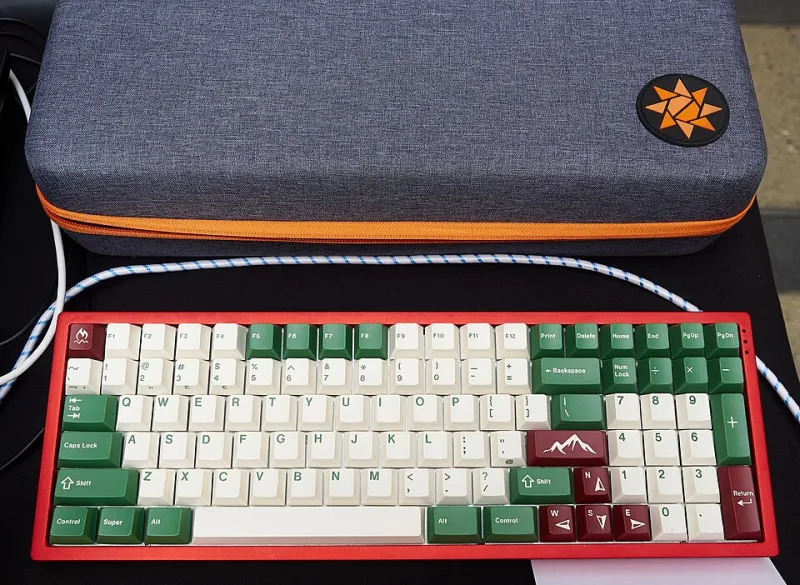
Photo: Patrick Breen, CC BY 2.0, via Wikimedia Commons
Let's be honest about something. Most people building out a mobile workstation spend serious time obsessing over the laptop itself — the processor, the RAM, the display. They drop money on a quality docking hub, maybe a portable monitor. They agonize over which backpack fits everything without destroying their spine.
Then they grab whatever keyboard is closest and call it a day.
That's a mistake. And if you've ever found yourself mentally checked out after an hour of working from a coffee shop or a hotel room, unable to focus, weirdly fatigued, making more typos than usual — there's a decent chance your keyboard is the culprit.
Why the Keyboard Is the Most Personal Piece of Gear You Own
Here's the thing about keyboards that makes them different from, say, a USB hub or a cable organizer: they're deeply, almost weirdly personal. Two people can sit down at the exact same keyboard and have completely opposite reactions. One person finds it crisp and satisfying. The other finds it exhausting to type on for more than twenty minutes.
That's because keyboard feel — the combination of key travel, actuation force, switch type, and layout — interacts with the way your specific hands and fingers move. Your typing style, developed over years, is essentially muscle memory baked into your body. When a keyboard fights that memory instead of working with it, you're burning mental energy on the physical act of typing rather than on the actual work.
For someone working from home at a fixed desk, a bad keyboard is annoying. For someone working from airports, client offices, co-working spaces, and Airbnbs, it's a productivity killer that compounds across every single session.
The Laptop Keyboard Problem Nobody Wants to Admit
Most laptop keyboards are compromises. That's not a hot take — it's just physics. Laptop manufacturers are working within strict thickness and weight constraints, which means key travel gets sacrificed, layouts get tweaked, and the overall typing experience takes a back seat to thinness.
Some laptops do this better than others. ThinkPads have a devoted following for a reason — their keyboards have historically offered more travel and better tactile feedback than most of the competition. The Framework laptops have also earned praise here. On the other end of the spectrum, plenty of premium ultrabooks offer keyboards that feel like typing on a slightly elevated piece of glass.
If your laptop's keyboard works for you, great — you've got one less thing to carry. But if you've noticed that you're slower, less accurate, or more fatigued when working away from your desk setup, it's worth questioning whether the built-in keyboard is actually serving you.
The Case for Carrying an External Keyboard
Adding an external keyboard to your mobile kit sounds counterintuitive. You're already hauling a laptop, a charger, maybe a mouse. Why add more weight?
Because for many people, the productivity gain is worth it. A keyboard you actually enjoy typing on — one that matches your preferences and doesn't fight your muscle memory — can meaningfully increase your output and reduce the mental drag that comes with grinding through a long work session on hardware that doesn't fit you.
The real question is which kind of external keyboard makes sense for a portable setup.
Compact mechanical keyboards have exploded in popularity over the last few years, and for good reason. A 65% or 75% layout cuts out the numpad and some function keys, shrinking the footprint significantly without sacrificing the keys most people actually use. Boards like the Keychron K3 or the MelGeek Mojo68 are legitimately portable — thin enough to slide into most laptop bags without drama — and they offer the kind of typing experience that enthusiasts genuinely get excited about.
The trade-off is noise. Mechanical keyboards click. Some of them click loudly. In a quiet library or a shared office, that's a real consideration. Linear switches (like reds or yellows) are quieter than clicky options, and there are specific "silent" switch variants designed for exactly this situation. If you're the kind of person who works in public spaces a lot, this matters.
Low-profile mechanical keyboards split the difference nicely. Options like the Keychron K1 or the Logitech MX Keys use slimmer key caps and shorter travel while still offering more feedback than a typical laptop keyboard. They're easier to toss in a bag and less likely to annoy your fellow coffee shop patrons.
Membrane and scissor-switch keyboards — the kind you find in most budget wireless options — are quieter and cheaper, but they tend to offer the least satisfying typing experience. For some people, that's fine. If you're not a keyboard person and you just want something functional that doesn't cost much, a solid Bluetooth membrane board does the job.
Layout Is More Important Than You Think
One thing that often gets overlooked in keyboard discussions is layout consistency. If you're switching between your laptop's built-in keyboard and an external board, mismatched layouts can actually slow you down and introduce errors.
This is especially true for keys like the tilde, the backslash, and function row shortcuts. If those keys are in different positions on your two keyboards, your hands are constantly recalibrating. Over a long work session, that friction adds up.
Ideally, your external keyboard should mirror the layout of your laptop's keyboard as closely as possible — or you commit to using the external board consistently enough that it becomes your primary muscle memory.
How to Actually Test Before You Buy
Here's the practical problem: keyboard feel is almost impossible to evaluate from a product description or even a YouTube video. You need to put your hands on it.
If you're in a major US city, your best bet is finding a local keyboard meetup or a well-stocked electronics store that keeps demo units out. Microsoft Stores (where they still exist) and Best Buy sometimes have keyboards available to try, though selection is limited. Micro Center locations are often better for this.
Online, the mechanical keyboard community on Reddit (r/mechanicalkeyboards) is genuinely helpful for recommendations based on specific preferences. Describe what you're looking for — quiet vs. tactile, portable vs. full-size, budget range — and you'll get useful, opinionated feedback from people who have tried a lot of keyboards.
If you're buying blind, prioritize sellers with good return policies. Amazon's return window is useful here. Some specialty keyboard retailers also offer switch testers — small boards with individual switches you can press — so you can evaluate the feel before committing to a full board.
The Bottom Line
Your mobile setup is only as strong as its weakest link. You can have the fastest laptop on the market, a perfectly calibrated portable monitor, and a USB-C hub with every port you'll ever need — and still find yourself grinding through the workday if the thing your fingers are touching for eight hours doesn't fit how you work.
The keyboard question doesn't have a universal answer. The right choice depends on your typing style, your noise tolerance, how much weight you're willing to carry, and — honestly — your budget. But it is a question worth asking seriously, probably before your next gear purchase.
Because the best mobile workstation isn't the one with the most impressive specs. It's the one you can actually work on, comfortably, wherever you happen to be.