Why the Screen on Your Expensive Laptop Might Actually Be the Worst Thing About It
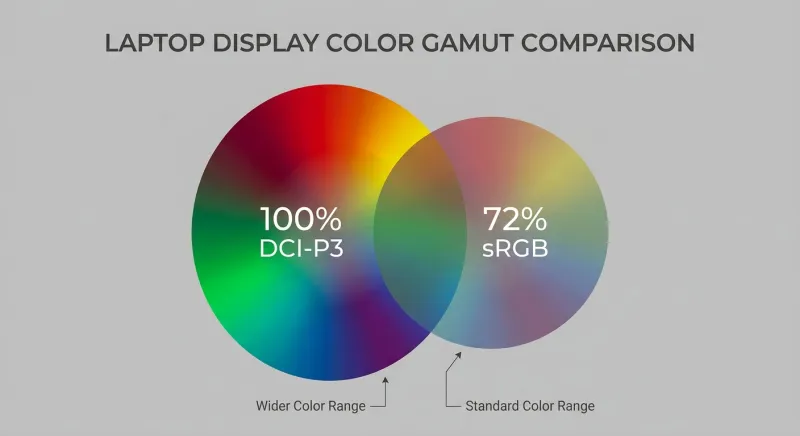
Photo: laptop screen display color accuracy comparison side by side creative professional, via www.newegg.com
Imagine spending $2,200 on a laptop, unboxing it, opening a photo you took last weekend — and immediately noticing the colors look slightly off. A little washed out. Maybe a bit cool. You tell yourself it's probably just the room lighting.
It's not the room lighting.
Display quality is one of the most inconsistently executed aspects of modern laptop design, and the disconnect between price and panel performance is genuinely baffling once you start looking at the numbers. A $649 laptop from a brand you've never heard of can — and sometimes does — ship with a noticeably better screen than a flagship business machine from a household name. Understanding why that happens is the first step to not getting burned.
The Specs That Actually Matter (And the Ones That Don't)
Marketing teams love to lead with resolution. 4K! Retina! 2.8K OLED! These numbers are easy to communicate and they sound impressive. But resolution is one of the least important display specifications for most professional use cases, once you're above a certain baseline.
Here's what actually moves the needle on screen quality:
Color accuracy and gamut coverage. This is measured in percentage coverage of standard color spaces — sRGB for general use, DCI-P3 for video work, Adobe RGB for print-adjacent photography. A screen that covers 100% sRGB will look vivid and accurate for everyday content. A screen that covers 90%+ DCI-P3 is genuinely useful for creative work. Many laptops — including expensive ones — ship with panels that cover 60–70% sRGB. That's not a typo. That's just a dim, muted screen with no good excuse for existing at that price point.
Peak brightness. Measured in nits, brightness determines how usable your screen is in the real world — not just in a dimly lit studio. For outdoor or mixed-light use, 400 nits is a reasonable floor. Screens that hit 500–600 nits start to feel genuinely versatile. Some premium OLED panels can burst to 1000+ nits for HDR content. Below 300 nits, you're basically committed to indoor use only.
Panel technology. IPS panels offer consistent color at wide viewing angles and are the current standard for quality. TN panels are cheaper, faster, and visually worse — still showing up in budget machines and, weirdly, some gaming-adjacent designs that prioritize refresh rate over everything else. OLED delivers exceptional contrast and color vibrancy but comes with concerns around burn-in, power draw, and long-term longevity that are worth weighing for daily professional use.
Refresh rate. 60Hz is the baseline. 120Hz feels noticeably smoother for scrolling, UI interaction, and video. For creative work, refresh rate matters less than color accuracy, but for anyone doing motion design or just wanting a snappier-feeling machine, 120Hz is worth seeking out.
Why Expensive Laptops Sometimes Fail Here
The uncomfortable truth is that display quality doesn't scale linearly with laptop price — and the reasons are partly structural, partly cynical.
Business-class laptops from major enterprise vendors are often optimized around a procurement checklist. IT departments buying 500 units care about security features, manageability, durability ratings, and keyboard quality. Display panel quality rarely appears as a line item in enterprise RFPs. So manufacturers have historically put mediocre screens in very expensive business machines and gotten away with it because the buyers weren't the ones staring at the screen all day.
Gaming laptops have the opposite problem. They often get excellent refresh rates — 144Hz, 165Hz, even 240Hz — but mediocre color accuracy, because the target user is prioritizing frame rate over color fidelity. A 165Hz panel with 65% sRGB coverage is genuinely not useful for a photographer.
Premium consumer ultrabooks are the most inconsistent category. Some — the MacBook Pro line, certain LG Gram models, select Dell XPS configurations — have excellent displays that justify their price. Others ride brand reputation and thin chassis design while quietly shipping panels that a $700 Chromebook would be embarrassed by.
The Budget Machines That Actually Get It Right
Here's where things get interesting for mobile workers watching their budget.
Several sub-$800 laptops have shipped with legitimately impressive displays in recent years. The Acer Swift series has included panels with 100% sRGB coverage at price points that feel almost irresponsible. Some ASUS VivoBook configurations have offered IPS displays with solid color accuracy that outperform comparably priced business-class alternatives. Certain Lenovo IdeaPad models have punched well above their weight on brightness and gamut.
The common thread is that these manufacturers, competing hard in the consumer segment, sometimes use display quality as a differentiator where others use thin design or processor tier. The result is machines that feel almost backwards on paper — mid-range chip, excellent screen — but that are genuinely better tools for visual work.
How to Evaluate a Display Before You Buy
If you can get hands on a machine before purchasing, here's a quick in-store or unboxing checklist:
- Open a photo with known colors — a skin tone, a blue sky, green foliage. Does it look natural or slightly off?
- Crank the brightness to max and see how it feels in the store lighting. Imagine it in sunlight.
- Tilt the screen back and forward about 20 degrees. If colors shift noticeably, it's a TN or low-quality IPS panel.
- Open a white background (a blank document, a white webpage) and look for yellowing or cool blue tinting that doesn't match your expectation.
If you're buying online — which is most of us, most of the time — the research approach is different:
- Look for professional display measurements from outlets like NotebookCheck or Rtings, not just reviewer impressions. They publish actual nit measurements and color gamut percentages.
- Search the specific model number plus "panel lottery" — some laptops ship with multiple different panels depending on production run, and user forums often document which batch got which screen.
- Check the return policy. Seriously. If a retailer gives you 30 days, use the first week to actually evaluate the display under your working conditions.
The Bottom Line for Mobile Professionals
If your work involves color — photography, video, design, even just client-facing presentations where you want things to look sharp — the display is one of the most important specs you should be researching, not the one you assume will be fine because you spent enough money.
The good news is that the information is out there. The testing community around laptop displays has gotten genuinely rigorous. You don't have to guess. You just have to look before you buy — and be willing to let go of the assumption that a higher price tag means a better screen.
Sometimes the $650 laptop is the one that makes your work look right. That's not a bug. It's just how this market works.