iPad Pro vs. Laptop: 7 Work Scenarios Where the Tablet Actually Wins (And 3 Where It Doesn't)
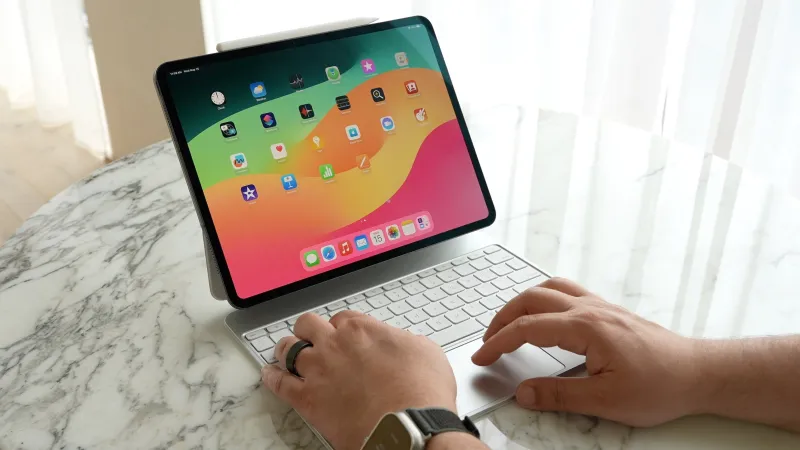
Photo: iPad Pro with Magic Keyboard and Apple Pencil on desk next to laptop coffee shop, via images.macrumors.com
Let's get something out of the way immediately: this isn't a hit piece on tablets, and it's not an iPad commercial either. The question of whether an iPad Pro can legitimately replace a laptop is one of the most genuinely contested debates in portable computing right now — and the honest answer is that it depends entirely on what you actually do for a living.
After spending serious time with the M4 iPad Pro paired with a Magic Keyboard and Apple Pencil Pro, across a range of real professional workflows, here's the breakdown that the spec-sheet comparisons usually miss.
The Setup That Makes or Breaks Everything
Before we get into the scenarios, let's talk accessories — because a bare iPad Pro is not a laptop replacement. The combination that actually competes with a traditional laptop requires:
- Apple Magic Keyboard with trackpad ($299–$349): Non-negotiable. The trackpad implementation in iPadOS has gotten genuinely good, and the keyboard action is solid for extended typing sessions.
- Apple Pencil Pro ($129): Transforms the device for any visual or annotation-heavy work.
- USB-C hub ($40–$80): You'll need ports. A compact hub adds SD card slots, HDMI, and extra USB-A without killing the portability advantage.
- A solid case for when the keyboard comes off.
All in, you're looking at a $1,500–$2,000+ total investment for a capable setup. That's laptop money — which is exactly why the comparison is worth taking seriously.
7 Scenarios Where the iPad Pro Genuinely Holds Its Own
1. Field-Based Content Creation
If your job involves shooting photos or video on location and editing on the go, the iPad Pro's combination of a Thunderbolt port, ProRes video support, and apps like Lightroom, LumaFusion, and Darkroom is genuinely compelling. Importing directly from a camera, doing a rough edit, and sending client-ready files — all from a device you can hold in one hand — is a workflow advantage that a 13-inch laptop can't replicate in the same way.
2. Client-Facing Presentations and Meetings
Flipping an iPad around to show a client something, annotating a proposal in real time with the Pencil, or pulling up a portfolio in Stage Manager while keeping notes open on the side — this is where the form factor shines. It feels more dynamic and interactive than cracking open a laptop lid.
3. Illustration and Graphic Design (Conceptual Phase)
For designers using Procreate, Affinity Designer, or Adobe Fresco, the iPad Pro with Apple Pencil Pro is the best drawing tablet on the market, period. If your workflow involves hand-drawn illustration, logo sketching, or storyboarding, there's no laptop setup that matches the natural feel of drawing directly on screen.
4. Project Management and Async Work
If your day is built around tools like Asana, Notion, Linear, or Slack, iPadOS handles all of it through excellent native apps or well-optimized web apps. The split-screen multitasking, combined with Stage Manager on external displays, is functional enough for organized project managers who live in these tools.
5. Reading, Research, and Long-Form Annotation
No laptop matches an iPad for reading PDFs, marking up research papers, or working through a long brief. The ability to highlight, annotate, and reorganize notes with a stylus while reading is a productivity pattern that a trackpad and keyboard just can't replicate as fluidly.
6. Travel-Day Productivity
In a middle seat on a flight from LAX to JFK, the iPad Pro's compact footprint and touchscreen flexibility beat a laptop with a clamshell lid every time. Tray tables are small, and the ability to use the device in multiple orientations — propped up, held in hand, keyboard attached — is a real advantage on travel days.
7. Lightweight Creative Entrepreneurs
For solopreneurs whose work lives in email, video calls, Google Workspace, basic content editing, and social media management, the iPad Pro with a keyboard genuinely covers 90% of the workflow. The remaining 10% often comes down to a single app that hasn't made the jump to iPadOS yet.
3 Scenarios Where a Laptop Still Wins, No Contest
1. Software Development
There's no kind way to say this: iPadOS is still not a real development environment. You can use Prompt for SSH sessions, Working Copy for Git, and Blink Shell for terminal work, but if you're writing and running code locally — especially anything involving local servers, Docker, or complex build tools — a laptop is the only practical choice. The iPad is a consumption and light-creation device at heart, and the OS doesn't yet expose the underlying hardware in ways that developers need.
2. Multi-App Power Workflows
Stage Manager is better than it used to be, but iPadOS multitasking still can't match the window management freedom of macOS or Windows. If your job requires juggling eight apps simultaneously with precise window sizing, quick switching, and deep keyboard shortcut control, the iPad's multitasking model will frustrate you. It's designed for focus, not sprawl.
3. Specialized Professional Software
If your livelihood depends on Final Cut Pro (the full desktop version), Adobe After Effects, AutoCAD, Excel with complex macros, or any specialized industry software that hasn't been ported to iPadOS, the iPad is simply not a viable replacement. The app gap is narrowing, but it's real — and for many professionals, one missing application is a dealbreaker that no amount of portability can overcome.
The Honest Verdict
The iPad Pro isn't trying to be a laptop, even when Apple's marketing occasionally implies otherwise. What it actually is — in the hands of the right user — is a phenomenally capable portable workstation optimized for visual, creative, and communication-heavy work.
If you're a designer, photographer, project manager, or content creator whose heaviest lifting happens in cloud-based or touch-optimized apps, the iPad Pro setup genuinely earns its place as a primary device. For developers, data professionals, and anyone whose workflow relies on desktop-class software, it's a powerful secondary screen and travel companion, not a replacement.
The most important question isn't "iPad or laptop?" It's "what do I actually do all day?" Answer that honestly, and the right choice becomes pretty clear.