Dock It Right: The Best Docking Stations and USB-C Hubs to Turn Your Laptop Into a Full Desk Setup
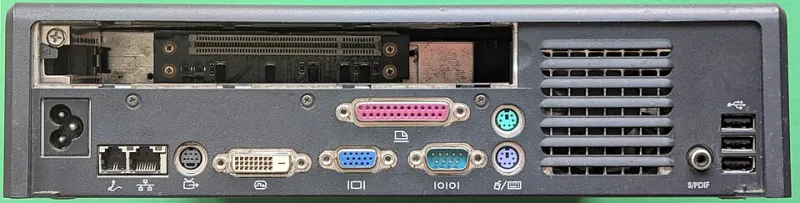
Photo: Siarhei Besarab, CC BY-SA 4.0, via Wikimedia Commons
There's a particular kind of frustration that hits when you're trying to connect a monitor, a wired keyboard, an external drive, and a webcam to a laptop that has exactly two USB-C ports. You end up with a rats' nest of adapters, something inevitably falls out, and you spend the first ten minutes of every work session playing cable Tetris. Sound familiar?
A good docking station or portable hub fixes all of that in one shot. The right dock turns your laptop — whether it's a MacBook Air, a Dell XPS, or a ThinkPad — into something that genuinely rivals a desktop setup. The wrong one creates new headaches: bandwidth bottlenecks, overheating, driver conflicts, or a price tag that makes your eyes water.
We've spent time with a wide range of options across different use cases and budgets. Here's what actually works in 2024.
What to Look for Before You Buy
Before diving into specific products, it's worth understanding the key specs that actually matter.
Thunderbolt vs. USB-C: Not all USB-C is created equal. Thunderbolt 3 and 4 offer up to 40Gbps of bandwidth, which is what you need for dual 4K monitors and fast external storage simultaneously. Standard USB-C (USB 3.2) tops out at 10-20Gbps — fine for most users, limiting for power users. Check what your laptop actually supports before spending Thunderbolt money on a machine that can't use it.
Power Delivery: Look for docks that can charge your laptop passthrough — ideally 90W or more for larger machines. Nothing worse than discovering your dock is slowly draining your battery while you work.
Thermal performance: Cheap hubs throttle under sustained load. If you're pushing data through multiple ports simultaneously, you want a dock with decent thermal management, not one that gets hot enough to fry an egg.
Best Overall: CalDigit TS4 Thunderbolt 4 Dock
Best for: Power users, creative professionals, anyone with a Thunderbolt-equipped Mac or PC Price: ~$250
The CalDigit TS4 is the dock that shows up in the setups of video editors, developers, and designers for good reason. It packs 18 ports into a compact tower-style form factor — including three Thunderbolt 4 downstream ports, a 2.5GbE ethernet jack, SD and microSD card slots, and a front-facing USB-A port for quick peripheral connections. Passthrough charging hits 98W, which covers even the 16-inch MacBook Pro.
Real-world performance is excellent. Running dual 4K monitors, a fast NVMe enclosure, and ethernet simultaneously produced no throttling or heat issues in extended use. It's not cheap, but for a primary work-from-home or office dock, it's hard to beat the reliability and port density.
The catch: The price stings if you're only using a fraction of those ports. And the tower design, while stable, takes up more desk real estate than flat alternatives.
Best for Multi-Monitor Setups: Plugable UD-4VPD
Best for: Hot-deskers and home office workers who need multiple displays Price: ~$200
If your workflow demands screen real estate — think financial analysts, UX designers, or anyone running a trading setup — the Plugable UD-4VPD is worth serious consideration. It supports up to four displays simultaneously via a mix of HDMI and DisplayPort outputs, handles 96W laptop charging, and connects via a single USB-C cable.
Plugable's software support is also notably solid for Windows users. The DisplayLink chip inside handles the multi-monitor magic, which means broad compatibility across Windows 10/11 machines. Mac users should note that DisplayLink requires a driver install and can occasionally cause minor visual quirks, though it's improved significantly in recent OS versions.
Best Travel Dock: Anker 777 Thunderbolt Docking Station (Slim Edition)
Best for: Digital nomads, frequent flyers, hot-desk workers Price: ~$180
For the backpack crowd, bulk is the enemy. The Anker 777 Slim manages to cram Thunderbolt 4 performance into a form factor that doesn't feel like you're hauling a brick. It supports dual 4K60 displays, delivers 90W charging, and includes USB-A, USB-C, ethernet, and audio ports — all through a single cable connection.
In coffee shop and co-working environments, the low-profile design and single-cable simplicity shine. You're not untangling anything; you plug in one cable and you're connected. Pack it up in under a minute. It runs slightly warm under heavy load but never throttled during testing. For anyone who changes work locations daily, this is a top-tier pick.
Best Budget Option: Anker 7-in-1 USB-C Hub (Model A8346)
Best for: Students, light users, occasional remote workers Price: ~$35
Not everyone needs Thunderbolt bandwidth or a dozen ports. If your setup is a single external monitor, a USB drive, and ethernet, a simple USB-C hub does the job without the three-figure price tag. The Anker 7-in-1 covers the basics cleanly: 4K HDMI, two USB-A 3.0, USB-C data, SD, microSD, and passthrough charging up to 100W.
It won't win any thermal awards under sustained load, and it's not built for power users pushing multiple high-bandwidth streams. But for the person who occasionally works from home and just needs a cleaner desk connection, it's genuinely hard to argue against the value.
Best for Windows Laptop Users: Lenovo ThinkPad Universal Thunderbolt 4 Smart Dock
Best for: Enterprise users, ThinkPad owners, Windows-first professionals Price: ~$230
Lenovo's enterprise dock brings a level of IT-friendliness that consumer docks don't bother with — remote management, BIOS updates through the dock, and rock-solid driver support for Windows environments. Port selection is comprehensive: dual 4K display support, four USB-A ports, two USB-C, ethernet, and audio. It charges at 100W.
For someone whose laptop is managed by a corporate IT department, or who simply wants the most hassle-free Windows docking experience, this one earns its place on the desk.
A Note on Cable Management
Even the best dock becomes a mess without some cable discipline. A few small investments make a big difference: velcro cable ties (not zip ties — you'll thank yourself later when you need to reroute something), a cable management tray or raceway under your desk, and a monitor arm that routes cables through its column. Ten minutes of setup saves daily frustration.
The Bottom Line
The right dock depends entirely on your situation. Power users with Thunderbolt machines should look hard at the CalDigit TS4. Road warriors will love the Anker 777 Slim. Multi-monitor workers should check out the Plugable UD-4VPD. And anyone on a budget who just needs the basics covered can save real money with a simple USB-C hub.
The point is the same across all of them: your laptop is already a capable machine. The right docking solution just lets it be a full workstation wherever you happen to land.