Integrated Graphics Grew Up — But Should You Trust Them for Real Work?
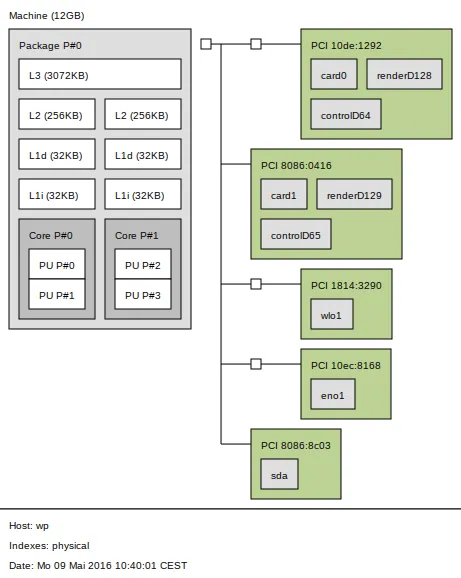
Photo: Kopiersperre (talk), BSD, via Wikimedia Commons
Not that long ago, telling a creative professional to rely on integrated graphics was basically an insult. It was the computing equivalent of handing someone a butter knife and saying, "good luck with that steak." Integrated GPUs were fine for web browsing, passable for YouTube, and completely useless the moment anything resembling actual visual work showed up on the timeline.
That reputation, though? It's starting to feel pretty dated.
The integrated graphics landscape has shifted dramatically over the past few years — and if you're still making buying decisions based on assumptions from 2018, you might be carrying more laptop than you actually need. Or, depending on your work, not quite enough.
What Changed, and Why It Actually Matters
The big turning point was architecture. Intel's Iris Xe series started showing real promise, but it was Apple's M-series chips that genuinely forced the conversation. When the M1 MacBook Pro landed in late 2020 and started trading blows with machines that had discrete Nvidia GPUs, the industry had to pay attention.
Since then, AMD's Radeon 780M (integrated into Ryzen 7000 series mobile chips) and Intel's Arc-based integrated graphics have pushed performance further than most people expected. We're now looking at iGPUs that can handle 4K timeline scrubbing, real-time color grading in DaVinci Resolve, and light 3D work without completely melting down.
The reason comes down to a few things happening simultaneously: better unified memory architectures, higher memory bandwidth, smarter driver optimization, and the fact that software like Adobe Premiere, Final Cut Pro, and Blender have all gotten better at leveraging whatever GPU is available — not just the expensive discrete ones.
Where Integrated Graphics Actually Hold Their Own
Video Editing (Light to Mid-Level)
For a lot of mobile editors — freelancers cutting social content, journalists turning around news packages, YouTubers editing vlogs — modern iGPUs are genuinely capable. On Apple Silicon, Final Cut Pro is almost eerily smooth. An M3 MacBook Air can cut 4K ProRes footage without breaking a sweat, and export times are competitive enough that you won't be sitting around a coffee shop for 20 minutes waiting for a five-minute video to render.
On the Windows side, a laptop running an AMD Ryzen 9 7940HS with Radeon 780M integrated graphics can handle 1080p and even 4K H.264/H.265 timelines reasonably well in Premiere Pro. It's not effortless, but it's workable — especially if you're not stacking a dozen effects layers.
Graphic Design and Illustration
For Illustrator, Photoshop, Affinity Designer, and similar tools, integrated graphics have been "good enough" for longer than most people realize. These apps aren't GPU-bound in the same way video work is. A modern iGPU handles canvas rendering, layer compositing, and even some AI-assisted features without noticeable lag. If your daily workflow lives in these tools, you genuinely don't need a discrete GPU — and the battery life you'll gain by not having one is real and meaningful.
Everyday 3D Modeling
This one's more nuanced. Blender's viewport performance on integrated graphics has improved significantly, and for modeling, UV unwrapping, and rigging, you'll likely be fine on a modern iGPU. Simple scenes render acceptably. But the moment you start adding complexity — dense meshes, particle systems, volumetrics — the cracks start to show.
Where Discrete Graphics Still Justify the Weight
Here's where we have to be honest: there are workloads where integrated graphics still hit a wall, and pretending otherwise would be doing you a disservice.
GPU-Accelerated Rendering
Cycles rendering in Blender, Octane, Redshift, V-Ray — these are fundamentally different beasts. Discrete GPUs have dedicated VRAM, which is a hard requirement for complex scene rendering. Integrated graphics share system RAM, and while unified memory architectures (especially Apple's) have made this less painful, you're still going to feel the difference on anything beyond basic scenes. If you're a 3D artist doing client work with real deadlines, a machine with a discrete GPU isn't optional — it's a professional tool.
High-Resolution Video with Complex Effects
Once you're stacking RED or ARRI footage, working in 6K or 8K resolutions, or building timelines with heavy color work and motion graphics, integrated graphics start to struggle. Proxy workflows can help, but they add friction. A laptop with an Nvidia RTX 4060 or 4070 will handle these pipelines with far less babysitting.
Machine Learning and AI-Assisted Tools
This is the category that's growing fastest and where the iGPU gap is most visible. Tools like Topaz Video AI, Stable Diffusion, and AI-powered upscaling features in various apps rely heavily on CUDA cores (Nvidia) or dedicated AI accelerators. Apple's Neural Engine does a solid job for Apple-native AI tasks, but cross-platform AI tooling still skews heavily toward Nvidia's ecosystem. If your work involves any meaningful AI processing, discrete is still king.
Gaming (Yes, Some of Us Work and Play)
Look, not every mobile workstation user is purely professional. If you want to actually game on your machine — not just run indie titles at low settings, but play modern AAA games — integrated graphics will disappoint you. Full stop.
The Battery and Weight Trade-Off Is Real
Here's the thing that often gets lost in pure performance comparisons: discrete GPUs cost you something even when you're not using them. They add weight — typically 200 to 400 grams on a mid-range gaming laptop versus an ultrabook equivalent. They consume power even in idle states. And they generate heat, which affects thermal throttling across the whole system.
For someone hauling their setup through airports, coffee shops, and coworking spaces, those trade-offs aren't abstract. A machine that lasts 12 hours on integrated graphics versus 6 hours with a discrete GPU is a fundamentally different travel companion.
So What Should You Actually Do?
The honest answer is to map your work before you map your specs. If you're a graphic designer, a video journalist, a web developer, or a writer who occasionally touches Lightroom, a modern thin-and-light with solid integrated graphics is probably all you need — and you'll love the battery life and the lighter bag.
If you're a 3D artist, a VFX editor, a machine learning practitioner, or someone whose livelihood depends on rendering speed, the discrete GPU is still worth the weight. Don't let the hype around iGPU progress talk you out of the hardware your actual workflow demands.
The good news is that the middle ground has gotten a lot more livable. Integrated graphics aren't a compromise for everyone anymore — they're the right answer for a growing chunk of mobile professionals. The trick is knowing which side of that line you're on.